
Start your journey to seamless, cloud-powered communication.
Modern Cloud Telephony for
Growing Businesses

A secure, cloud-hosted business phone system from BSNL that connects your teams, customers, and offices – anytime, anywhere.
BSNL Cloud PBX replaces traditional PBX hardware with a powerful cloud-based calling platform.
It enables seamless communication across mobile phones, IP phones, and existing PBX systems, while reducing costs and improving reliability.
Core Features

Cloud-Hosted PBX
No on-premises PBX hardware. Fully managed and scalable.

Unified Calling Experience
Use smartphones, IP phones, or desk phones with one system.

Intelligent Call Routing
IVR, ring groups, and business-hour routing ensure every call reaches the right person.

Real-Time Monitoring & Control
Dashboards, alerts, and reports for complete visibility.
Overview
Business calling,
without the complexity
BSNL Cloud PBX is a fully managed, cloud-based IP-PBX solution designed for businesses of all sizes.
Instead of installing and maintaining physical PBX hardware, your entire phone system runs securely in the cloud, managed by BSNL.
Employees can make and receive calls using mobile apps, IP phones, or existing desk phones, while administrators gain full control through an easy-to-use dashboard.
Why Choose BSNL Cloud PBX

No On-Premise Hardware
No PBX boxes, no wiring hassles

Lower Monthly Costs

Work From Anywhere

Reliable BSNL Network

Salient Features
- Extension Dialing across all users
- Pickup Groups for faster call handling
- Business Hour Routing & Holiday IVRs
- Multi-Level IVR with custom greetings
- Voicemail boxes with personalized messages
- Call Forwarding & Follow Me
- Timeout & fallback routing
- Ring Groups with advanced strategies: Ring All, Round Robin, Least Talk Time, Fewest Calls, Progressive Routing
- Conference Rooms (UC/CC) with PIN & recording
- Station Monitoring for extension status
- Call Transfer (blind & attended)
- Call Hold, Call Waiting & Music on Hold
- Audio Manager for IVR & prompt uploads
- Secure SIP connectivity
- Scalable extensions & lines
- Multi-location support under one PBX
- Works without static IP (internet-friendly)
Traditional PBX vs Cloud-based PBX
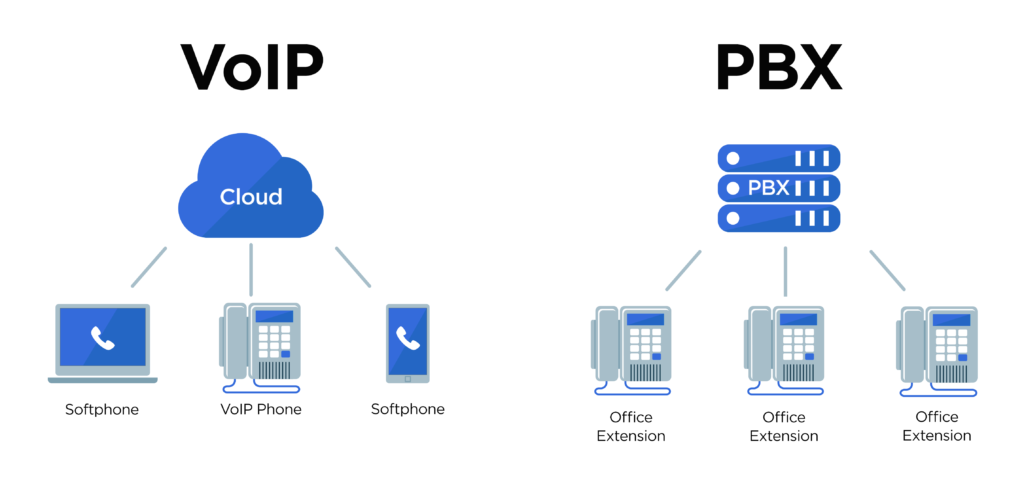
Traditional PBX
- Heavy, hardware-based system requiring PBX boxes, UPS, and cabling
- Installed and maintained on customer premises
- Requires dedicated IT resources for setup and maintenance
- High upfront investment (CAPEX) plus ongoing maintenance costs
- Limited flexibility for scaling or remote work
BSNL Smart vPBX XL
- Lightweight, cloud-based solution with no on-site hardware
- Fully cloud-hosted and accessible via mobile and web apps
- Easy self-configuration through a simple admin dashboard
- Affordable monthly subscription with predictable pricing
- Instantly scalable and ideal for remote and multi-location teams
Industry Use Cases
Finance Sector
Centralized IVR for customer queries
Secure call routing for sensitive financial discussions
Missed-call alerts ensure no customer inquiry is lost
Secure and responsive customer communication
Meanwhile:
- A missed call from a high-value client is automatically flagged on the dashboard
- A relationship manager receives an alert and returns the call immediately
- Internal teams coordinate using extension dialing to verify documents and approvals
- IVR Routing
- Missed Call Alerts & Dashboard Notifications
- Internal UC Extensions
- Call Monitoring & Reports
Clinics & Hospitals
Department-wise IVR (OPD, pharmacy, lab, billing)
Doctors and staff reachable via extensions
Faster patient coordination without physical movement
At the same time:
- Calls to doctors outside consultation hours are automatically forwarded or sent to voicemail
- Reception staff see extension availability before transferring calls
- Missed calls are logged, ensuring every patient is called back
Solution Capabilities Used
- IVR Routing
- Business Hour Routing
- Call Forwarding & Voicemail
- Missed Call Tracking
- Doctors and nurses communicate internally using short extension numbers
- Emergency calls are prioritized and routed instantly
- Administrative teams monitor call activity through the live dashboard
- Multi-Level IVR
- Extension Dialing & Pickup Groups
- Priority Routing
- Real-Time Dashboards
Cooperative Banks
- Single published number for all branches
- Internal extension dialing between branches
- Call monitoring for service quality
Single number, multi-branch connectivity
- Branch staff consult other branches using inter-branch extension dialing
- Calls during non-working hours follow holiday or after-hours IVR rules
- Supervisors review call patterns to improve customer service quality
Solution Capabilities Used
- IVR with Branch Routing
- Multi-Location Extensions
- Business Hour & Holiday IVR
- Call Analytics & Reports
Cooperative Offices
- Easy internal communication between departments
- Business-hour routing for citizen-facing services
- Cost-effective multi-office connectivity
- Internal staff coordinate using extension dialing instead of personal phones
- Calls unanswered by one team are automatically routed to another group
- Management tracks service responsiveness using call reports
Solution Capabilities Used
- IVR Routing
- Ring Groups & Timeout Routing
- Internal Extensions
- Reporting & Dashboards
Who can use BSNL Cloud PBX?
It is ideal for small, medium, and large organizations, including banks, clinics, hospitals, cooperative offices, call centers, and multi-branch enterprises.
Can I keep my existing phone numbers?
Yes, all existing BSNL numbers can be retained.
Do I need new phones?
Not mandatory. IP phones are recommended, but existing desk phones work using gateways.
Is there a limit on extensions or lines?
No. The system is fully scalable.
What if the internet goes down?
Can employees work remotely using Cloud PBX?
What happens to calls after business hours?
Calls can be routed to voicemail, forwarded to designated numbers, or handled using holiday and after-hours IVR rules.